How to use a soundboard on Discord
Choose Discord's Soundboard or a desktop soundboard
“Discord soundboard” can mean two different things. Discord has a built-in Soundboard attached to servers and voice channels. A desktop soundboard such as Echo Live runs on your computer and sends your sounds into Discord through the microphone route. Both play clips in a call, but the setup and ownership are different.
Use Discord's built-in Soundboard when the server already has the sounds you want and you only need short reactions inside Discord. Every server starts with a small set of sound slots, server admins control uploads and permissions, and Server Boosts unlock more slots. You do not need Nitro to use sounds inside their own server; Nitro is required when you want to use a server's sounds in other servers.
Use a desktop soundboard when you want your own boards, your own file library and the same hotkeys across Discord, games and streaming software. Echo Live keeps those sounds on your computer and routes them through a configured virtual audio cable, so the board is not tied to one Discord server.
How to use Discord's built-in Soundboard
Step 1: Join a voice channel in the Discord desktop app. If Soundboard is enabled for that channel, you will see the Soundboard icon near the voice controls.
Step 2: Open Soundboard and choose a sound. Use Play when you want everyone in the channel to hear it, or use the speaker control to preview it for yourself. You can favorite sounds you want to find again.
Step 3: To add a server sound, open Soundboard on desktop or in the desktop browser and choose Add Sound. You need the relevant server permission, and the server needs an available slot. Name the sound clearly and set its volume before uploading it.
Discord also supports Soundboard on mobile, but new sounds can only be uploaded from desktop or the desktop web app. Discord's own Soundboard guide has the current mobile, permission and server-management steps.
What you need for Echo Live
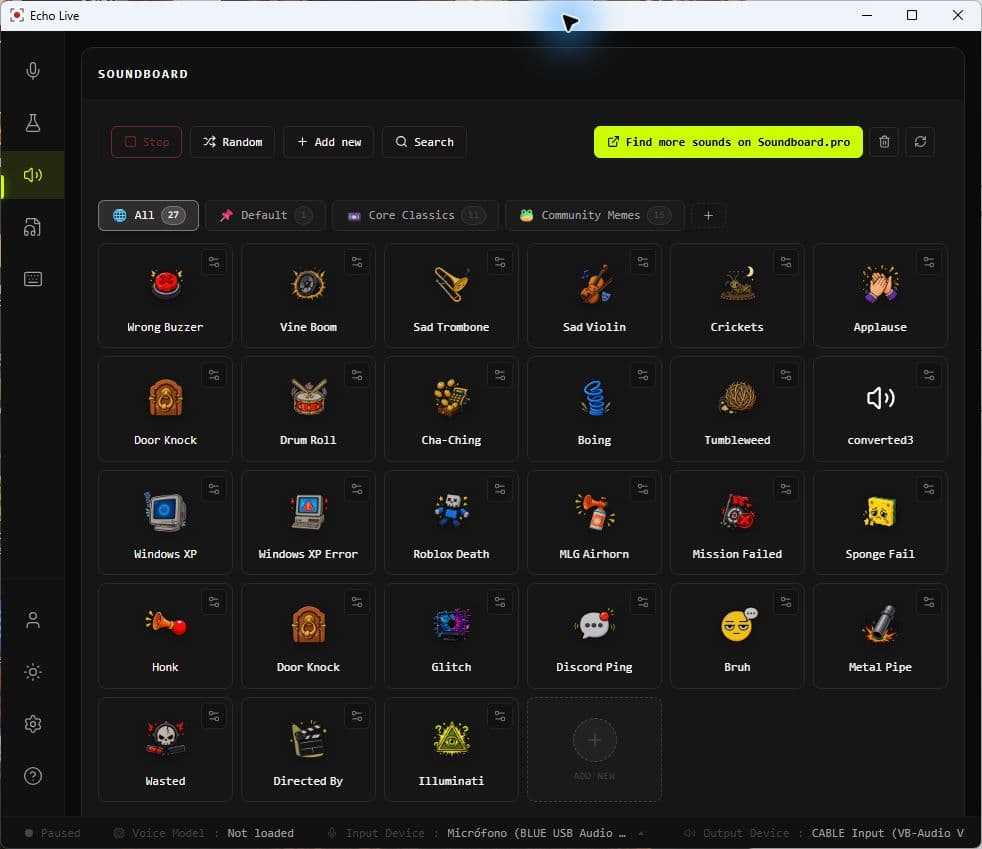
Install Echo Live, choose the microphone you normally use, and make sure Echo has a working virtual audio cable selected. Keep your headphones or speakers available as your normal listening device. The virtual cable is what carries Echo's output into Discord; it is not a replacement for your headphones.
Echo Live includes a Core Classics board, so you can test the route before importing anything. You can then add WAV, MP3, OGG and FLAC files, create separate boards, rename and tag clips, and assign a hotkey to each sound.
How to connect Echo Live's soundboard to Discord
Step 1: Open Echo Live and select your normal microphone. In Echo's audio settings, confirm that the virtual audio cable is detected, selected and ready before you open a Discord call.
Step 2: Open Soundboard in Echo. Play one of the bundled sounds first. Once that works locally, create a board for Discord, import the clips you want and assign hotkeys to the sounds you use most.
Step 3: In Discord, open User Settings → Voice & Video → Input Device. Select the capture side of the same virtual cable Echo is using. With VB-Cable on Windows, this is commonly shown as `CABLE Output (VB-Audio Virtual Cable)`. Keep Discord's Output Device set to your normal headphones or speakers.
Step 4: Run Discord's Mic Test. Talk into your microphone, then trigger a sound in Echo. The meter should react to both. If it only reacts to your voice, Discord is probably still listening to your raw microphone instead of the cable.
Step 5: Join a quiet call and ask someone to confirm the level before you bring the board into a busy server. Keep Echo Live running while you use its soundboard or voice changer.
How the audio route works
The route is: your microphone enters Echo Live, Echo sends its output to the virtual cable, and Discord uses the cable's capture side as its Input Device. Soundboard clips use the same configured cable route while also playing to Echo's normal output, so you can hear what you triggered.
The soundboard and voice changer can run at the same time, but the clips are not pushed through the active AI voice or Voice Lab effect chain. Your voice stays changed while each clip plays as its own audio. This avoids turning a clean reaction sound into a distorted version of itself.
Build a Discord board you can actually use
Make boards around situations, not file types. A compact “Squad” board might hold a victory cue, a fail sound, a warning and two running jokes. A D&D board might hold one set of tavern, combat and spell cues. Echo lets the same sound appear on more than one board, so you do not need duplicate files for a clip that fits several situations.
Use names and tags you can recognize at a glance. Put the sounds you need most near the start of the board and choose hotkeys that do not collide with Discord push-to-talk or your game controls. Echo can play overlapping clips, shows which sounds are active, and includes Stop All when a moment gets noisy. Random can pick from the current view when that is part of the bit.
Short clips are usually easier to time in a conversation than long music or dialogue. Test volume with another person rather than assuming the level sounds the same on your computer and in Discord. Only import or upload audio you created or have permission to use.
If you need ideas, browse Soundboard.pro as a discovery resource. Direct Soundboard.pro import and managed boards are planned Echo Live integrations, not current features.
Discord soundboard not working? Check these in order
Friends hear your voice but not the soundboard: open Discord's Voice & Video settings and confirm Input Device is the virtual cable's capture side, not your physical microphone. Run Mic Test again and watch the meter while a clip is playing.
Discord receives neither your voice nor your clips: return to Echo's audio settings and confirm the physical microphone and both sides of the virtual cable are available. Cable names can be confusing: Echo sends audio to the render side, while Discord listens to the capture side. With VB-Cable, Discord normally listens to `CABLE Output`, not `CABLE Input`.
Clips are chopped, quiet or disappear: Discord's noise suppression can treat music and effects as background noise. Test with Noise Suppression off, then check input sensitivity and Echo Cancellation one setting at a time. Do not change every control at once or you will not know which setting fixed it.
Friends hear a doubled or delayed copy of you: Discord, Windows or streaming software is probably capturing both the raw microphone and Echo's routed output. Keep one microphone route into Discord and check OBS or other audio software for a second active mic source.
You cannot hear the clip but Discord can: check the normal output device and system volume used by Echo. The local listening route and the virtual-cable route are separate, so one can work while the other is muted or pointed at the wrong device.