Echo Lite · Voice changer extension
A voice changer for your next browser call.
Go deeper. Go robotic. Become a character. Bring AI voices and your own sense of humor into the conversation with Echo Lite, the voice changer extension for Chrome.
Bring it into your next call
Add Echo Lite to ChromeFor desktop Chrome and Chromebook.
- Free voices and soundboard included
- No account needed to start
- No desktop app or virtual cable
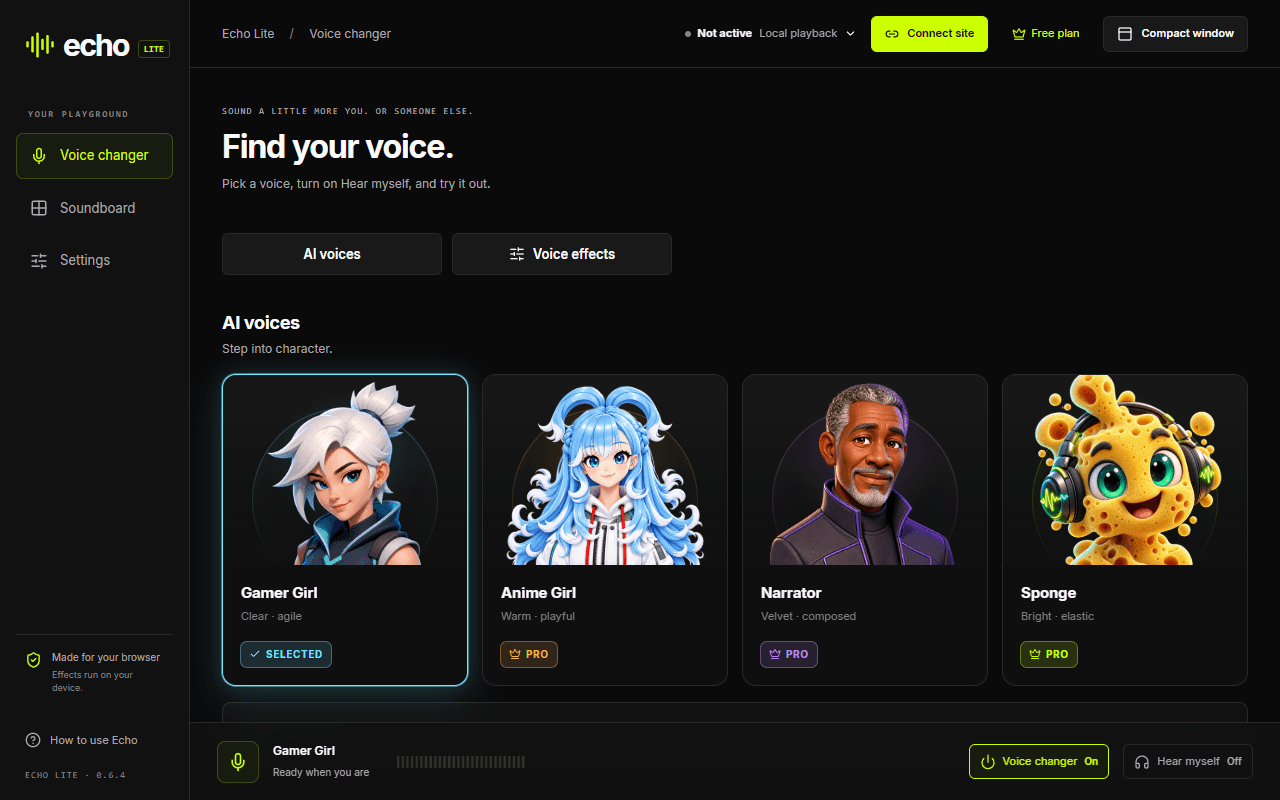
Change your voice online, while the conversation happens
Connect your calling site, choose a voice, and talk through your usual microphone. Echo Lite changes the audio your friends hear in supported browser calls. There is no desktop app or virtual audio cable to set up.
Make a voice your own
Start with Gamer Girl, Deep voice or Robot for free. Switch between AI voices and instant effects in the same library. Echo Pro opens up more voices and lets you create custom effects.
Listen before the big reveal
Put on headphones and turn on Hear myself to try your changed voice. Once connected, use the same voice in the call. AI performance depends on your device.
Bring the punchline, too
Open the included soundboard, add your clips, or trigger a Situation when the moment calls for it. Sounds play alongside your voice in a connected call.
AI voices and instant effects, in one extension
Use an AI voice for a different character, or choose an effect when you want a quick change. Voice processing runs on your device. The calling website receives the resulting audio, just as it receives your ordinary voice.
Explore the soundboard extension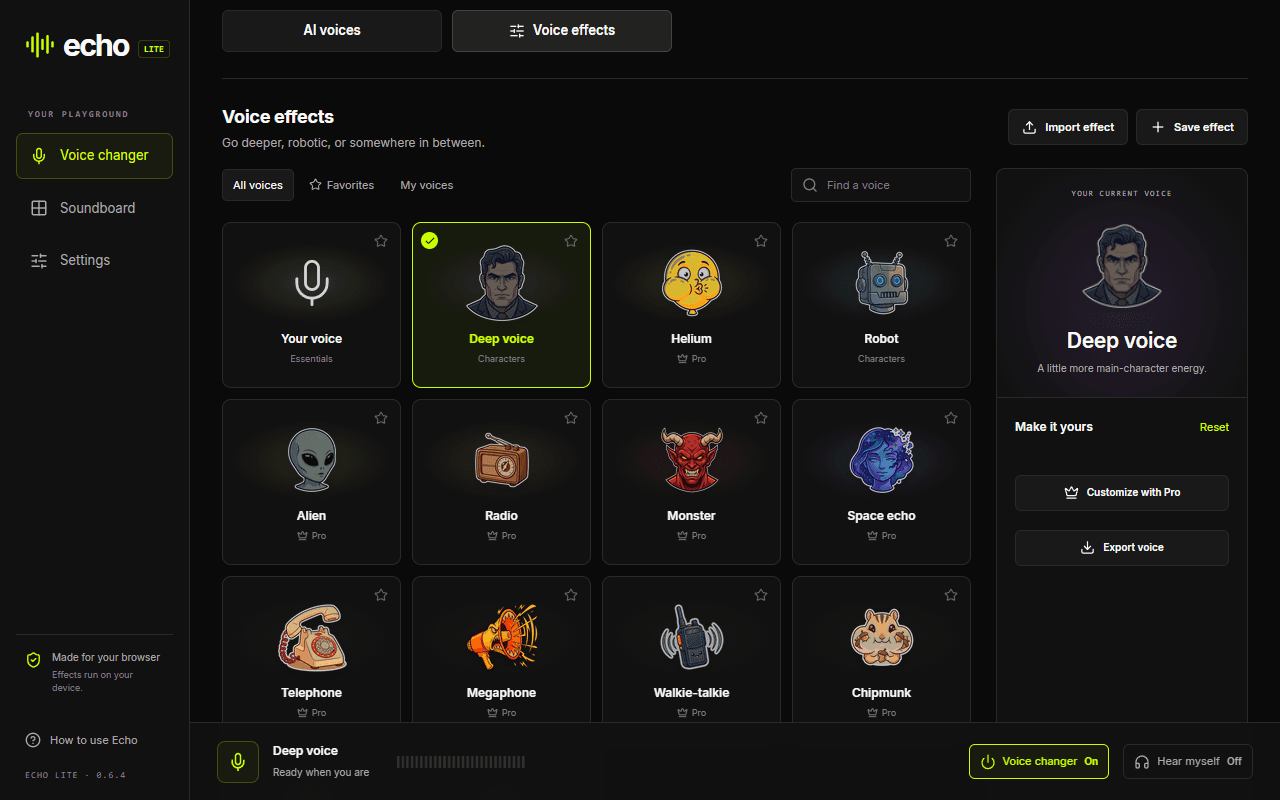
Choose your browser
Chrome is available now. The other store editions have been submitted; install links will appear here when they are published.
Chrome
Available to install
Microsoft Edge
Submitted · awaiting store publication
Firefox
Submitted · awaiting store publication
Opera / Opera GX
Submitted · awaiting store publication
Naver Whale
Submitted · awaiting store publication
On ChromeOS? Follow the Chromebook installation guide.
From install to your first reaction
Add Echo Lite to Chrome
Install from the Chrome Web Store, then pin Echo Lite from the browser’s Extensions menu. Free voices and sounds work without an account.
Connect your calling site
Open Discord web or your calling website. Open Echo Lite from the toolbar, choose Connect site, and allow access to that site and your microphone.
Refresh, rejoin, and pick a voice
If the calling tab was already open, refresh it and rejoin. Keep your usual microphone selected. Choose an AI voice or effect, then ask a friend to check what they hear.
Use headphones while testing. Refreshing a calling tab leaves the current call. School or workplace settings may restrict extensions or microphone access.
Match Echo to the way you call
Discord web
Voice effects, AI voices and soundboard audio have been tested in Chrome calls. Connect the site before joining.
Discord compatibilityGoogle Meet
Voice changing has been tested. Meet’s speech processing can filter soundboard clips, so test with a friend before relying on them.
Google Meet guideDesktop apps & games
For native apps and games, use Echo Live’s desktop audio setup. Echo Lite connects to calling websites inside the browser.
Desktop soundboardVoice changer extension questions
Is this a free voice changer extension?
Yes. Gamer Girl, Deep voice, Robot, the soundboard and one editable Situation slot work without an account. Echo Pro unlocks additional voices, custom effects and more Situation slots.
Does the voice changer work in Discord?
Echo Lite’s voice effects, AI voices and soundboard have been tested in Discord web calls in Chrome. Connect discord.com, refresh any existing call tab and rejoin with your usual microphone selected. Native Discord uses a different setup.
Can I change my voice without downloading a desktop app?
Yes. Echo Lite runs in your browser after you install the extension. You do not need a desktop voice changer, audio driver or virtual cable. If you want to change a recording without installing an extension, use the online voice changer tool instead.
Can I use an AI voice changer in my browser?
Yes. Echo Lite includes live AI voice conversion as well as instant voice effects. Processing runs locally. Performance varies by device, so try the free AI voice before choosing a paid plan.
Will it change my voice in desktop games or phone apps?
Echo Lite changes microphone audio in connected browser calling sites. It does not create a system microphone for native games, desktop calling apps or mobile apps. Use Echo Live’s desktop app for a desktop audio setup.
Make the next call a little less ordinary.
Start with free voices, your own sounds, and a reason to unmute.
Add Echo Lite to Chrome