Echo Lite · Soundboard extension
A browser soundboard for the perfect reaction.
A dramatic pause. A terrible joke. An impossible win. Give the moment its sound with a free browser soundboard, your own clips, and a mix of reactions behind one button.
Bring it into your next call
Add Echo Lite to ChromeFor desktop Chrome and Chromebook.
- Free voices and soundboard included
- No account needed to start
- No desktop app or virtual cable
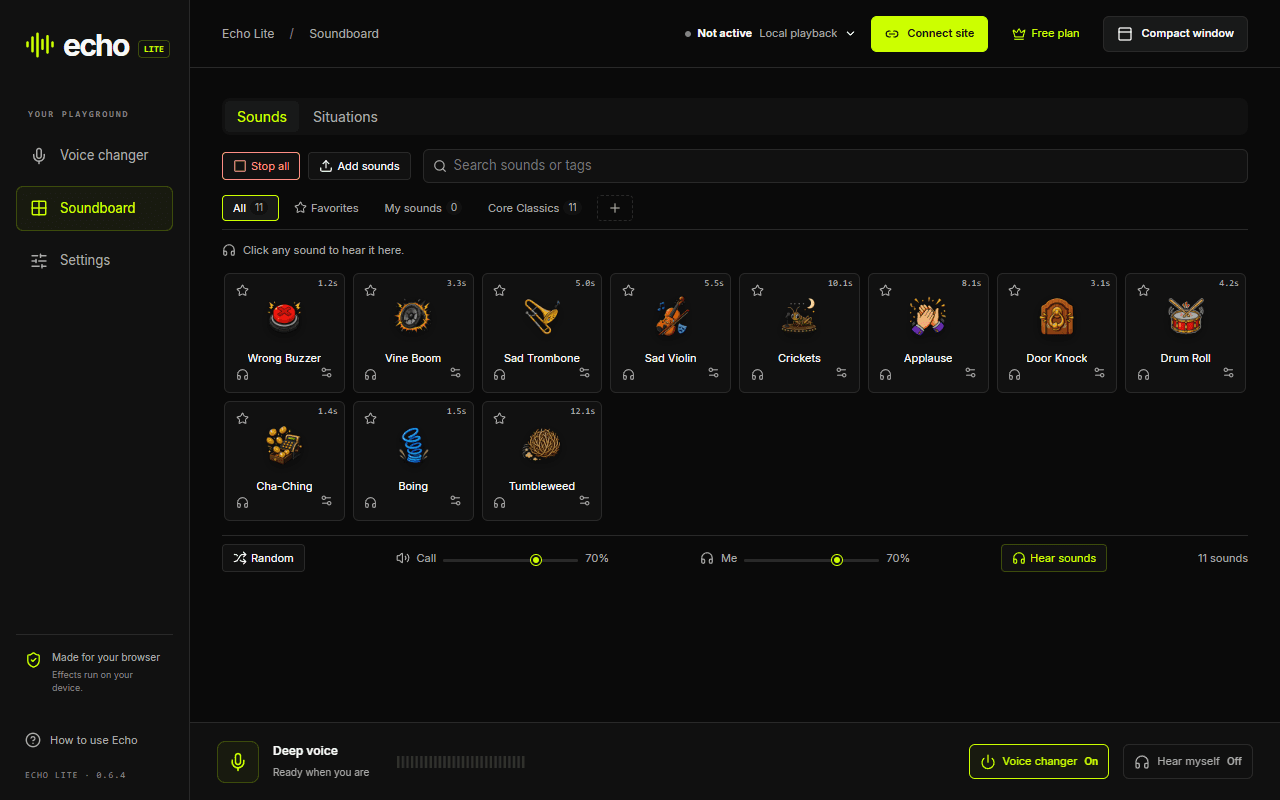
An online soundboard your friends can hear
A sound playing in your browser does not automatically reach the people in your call. Connect the calling site in Echo Lite and your soundboard clips join your microphone audio. In Discord web, you can talk and drop a meme sound without setting up a virtual cable.
Your clips. Your running jokes.
Use the included reactions or choose Add sounds to bring in your own audio. Search your sounds and keep your favorites close for the next perfectly timed interruption.
One moment, a different reaction
A Situation keeps a mix of sounds behind one button and skips recent repeats. Edit your free slot or replace its mix from soundboard.pro. Pro lets you keep more Situations.
Keep the joke at the right volume
Adjust Call for what your friends hear and Me for what you hear. The headphone preview plays locally. Stop all cuts the soundboard when it is time to let someone speak.
A meme soundboard that leaves room for surprise
Build a mix for awkward silence, a glorious fail, or whatever keeps happening in your group. Instead of repeating the same clip, a Situation chooses from its mix and avoids recent repeats. Your included Situation slot is free to edit.
Change your voice in the same call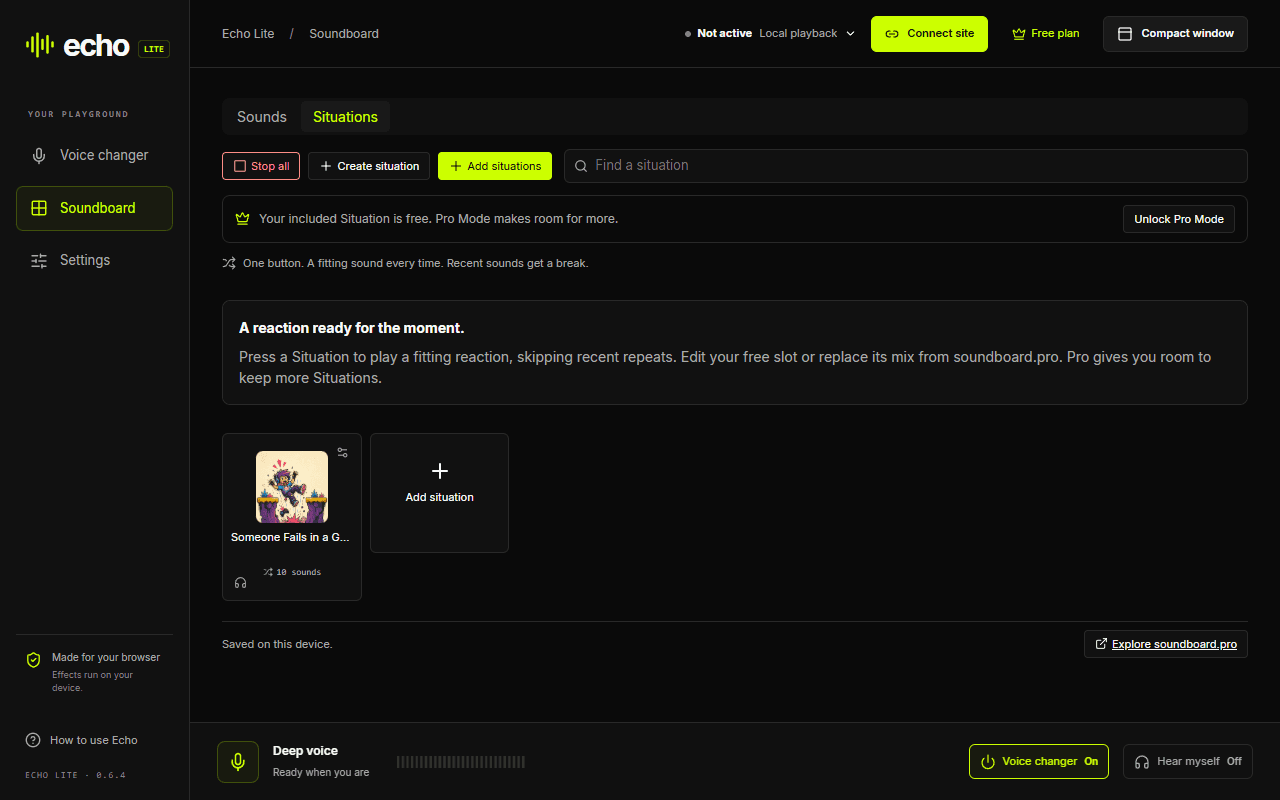
Choose your browser
Chrome is available now. The other store editions have been submitted; install links will appear here when they are published.
Chrome
Available to install
Microsoft Edge
Submitted · awaiting store publication
Firefox
Submitted · awaiting store publication
Opera / Opera GX
Submitted · awaiting store publication
Naver Whale
Submitted · awaiting store publication
On ChromeOS? Follow the Chromebook installation guide.
From install to your first reaction
Install and add your sounds
Add Echo Lite from the Chrome Web Store. Open Soundboard to try a reaction, or choose Add sounds for your own clips. You can start free without an account.
Connect the browser call
Open Discord web, open Echo Lite from the toolbar and choose Connect site. Allow access, refresh the calling tab if it was already open, and rejoin with your usual microphone selected.
Check what your friends hear
When Echo shows Active, click a sound tile and ask a friend to listen. Adjust Call and Me separately. Headphones help prevent feedback; the headphone preview button only plays to you.
Use headphones while testing. Refreshing a calling tab leaves the current call. School or workplace settings may restrict extensions or microphone access.
Match Echo to the way you call
Discord web
Voice effects, AI voices and soundboard audio have been tested in Chrome calls. Connect the site before joining.
Discord compatibilityGoogle Meet
Voice changing has been tested. Meet’s speech processing can filter soundboard clips, so test with a friend before relying on them.
Google Meet guideDesktop apps & games
For native apps and games, use Echo Live’s desktop audio setup. Echo Lite connects to calling websites inside the browser.
Desktop soundboardSoundboard extension questions
Is the soundboard extension free?
Yes. The ordinary soundboard, custom sound imports and one editable Situation slot are free without an account. Echo Pro adds more Situation slots, more voices and custom voice effects.
How do I play soundboard sounds through my mic in Discord?
Use Discord in Chrome, connect discord.com in Echo Lite, and refresh and rejoin if the tab was already open. Keep your usual microphone selected. When Echo shows Active, clicking a sound tile plays into the call alongside your voice. Ask someone in the call to confirm they hear it.
Is this an online soundboard with no download?
Echo Lite needs a browser extension installation, but no desktop app, driver or virtual audio cable. Once installed, you can play sounds locally or in connected browser calls. This page introduces the extension; it is not a playable soundboard itself.
Can I make a custom soundboard with my own sounds?
Yes. Choose Add sounds in Echo Lite to import your audio, then use search and favorites to find it. You can also edit the mix in your included Situation slot. Your own clips can sit alongside the included reactions.
Why can I hear the sound but nobody in the call can?
First check that Echo shows Active for the correct calling tab. Use a sound tile rather than its headphone preview, check the Call volume, and refresh and rejoin after connecting. Some calling sites filter non-speech audio. Where available, try reducing noise suppression and test again with a friend.
Does the soundboard work in Google Meet?
Voice changing has been tested in Google Meet, but soundboard clips can be affected by Meet’s speech processing. Test with another participant before relying on it. Hearing a local preview does not confirm that the call received the clip.
Make the next call a little less ordinary.
Start with free voices, your own sounds, and a reason to unmute.
Add Echo Lite to Chrome