Sounds ready from the start
Core Classics such as Vine Boom, Wrong Buzzer, Crickets, Applause, and Sad Trombone ship with the app, each with its own visual tile.
Build boards from your own sounds, trigger them with hotkeys, and play them in voice chat while Echo changes your voice. One free app for the whole live setup.
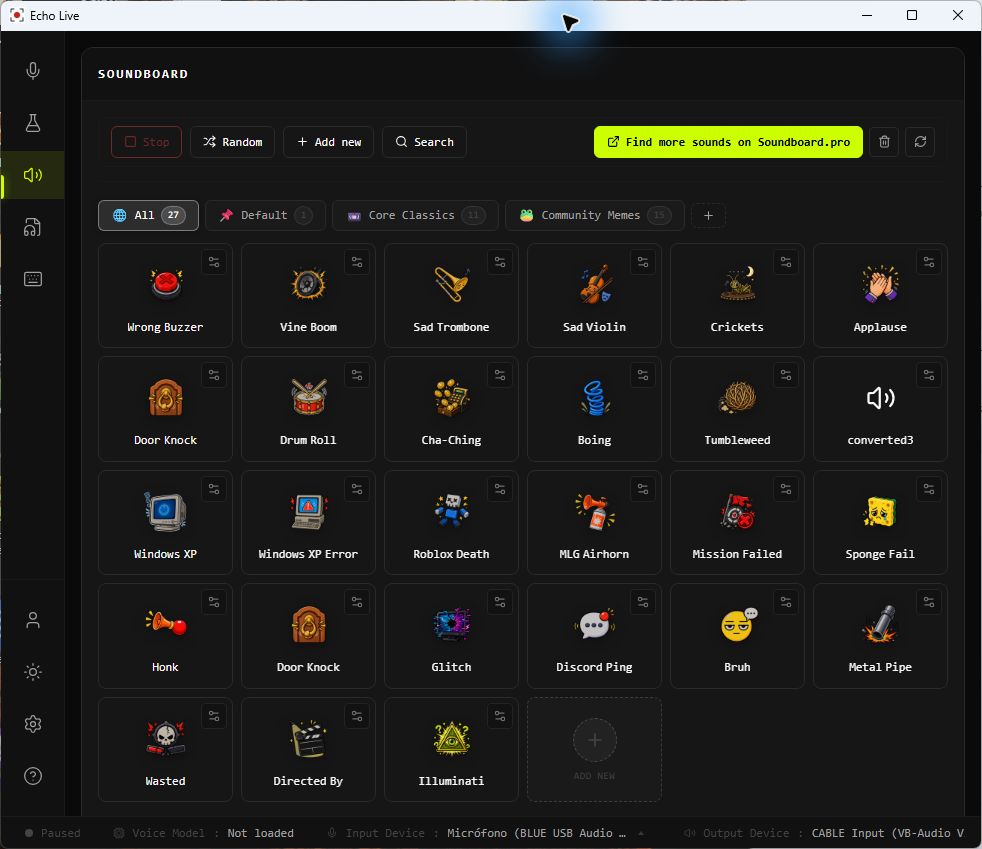
Start with the bundled Core Classics, add your own audio, and organize everything into boards for games, calls, streams, and characters.
Core Classics such as Vine Boom, Wrong Buzzer, Crickets, Applause, and Sad Trombone ship with the app, each with its own visual tile.
Create boards for a game, stream, character, or friend group. A sound can belong to more than one board, and boards can be renamed and reordered.
Assign a keyboard shortcut to any sound, see it on the tile, and trigger the clip without digging through folders or switching away from your game.
Rename clips and add tags so the right reaction is easy to find when your library grows.
Import WAV, MP3, OGG, and FLAC files. Echo keeps custom sounds alongside the bundled collection without locking you to a fixed catalogue.
Play more than one clip when you want a layered moment, see what is active, use Stop All to clear playback, or let Random pick from the current view.
Start with the bundled sounds, import your own WAV, MP3, OGG, or FLAC files, or install the optional community pack from inside the soundboard.
Group clips for a game, stream, character, or running joke. Rename and tag sounds, then drag tiles and boards into the order you want.
Give the sounds you need most a keyboard shortcut so you can trigger them while your game, call, or streaming software stays in front.
Configure your virtual audio cable in Echo, then choose that cable as the input in Discord, your game, or streaming app. Test the route before going live.
Trigger reactions, victory sounds, team jokes, and quick cues without leaving the game or hunting through browser tabs.
Keep intros, transitions, chat reactions, and recurring bits ready on a board you can control with hotkeys.
Build boards for taverns, battles, spells, characters, and reveals, then play each cue when the scene needs it.
Turn clips you made or have permission to use into buttons, then sort them into boards for different groups and games.
Play short stingers, jingles, and transitions live while recording or broadcasting, with a Stop All control when the moment has passed.
Keep the soundboard running alongside EchoRVC and Voice Lab, so a character voice and its sound cues are controlled from the same app.
The soundboard is built into Echo Live alongside open RVC voices and Voice Lab effects. You can control the full performance in one app, while using the same virtual-audio routing that desktop voice apps rely on.
Echo Live's soundboard plays each sound to your normal output so you can hear it. When a supported virtual audio cable is configured, Echo also sends the clip there. Select that virtual cable as your microphone in Discord, your game, or your streaming app so everyone else can hear the sound.
Yes. Echo Live's soundboard imports WAV, MP3, OGG, and FLAC files. Add clips you created or have permission to use, place them on one or more boards, and assign hotkeys for live playback.
Download Echo Live free, add your sounds, set your hotkeys, and bring the board into your next game, call, or stream.
Download Echo